Tuesday, January 12, 2016

Top 24 Dynamics AX 7 search suggestions with comments

I think that harvesting social data to see what people are searching for in regards to a specific topic (e.g. Dynamics AX 7) can be very telling for what is going on and what people are interested in. One of the best ways IMO is to look at search engine suggestions with things like Bing and Google search suggestions. For those that don't know, search suggestions are the things that show up when you start typing in the search window of a search engine (Figure 1 below).


Figure 1 - Example Bing search suggestions

Below is a raw list of the search suggestions that I've compiled from various sources  in bold and added some commentary as to why people may be searching for them. Its obviously not THE reason for the searches but I'll try to add some insight into why I would be interested in that.


Top 24 search engine suggestions for 'Dynamics AX 7'
  1. dynamics ax 7
    • Its new. Its what I searched for...
  2. dynamics ax 7 release date
    • The release date has been speculated during 2014 and 2015 as well as who can implement it and its changed a bit over time as new features are added. We generally say 'Generally Available' (eg. GA'ed) instead of 'released'.
  3. dynamics ax 7 preview
    • Often new releases are available for people to preview before they upgrade or if an organization wants to get up to speed on what is changing so they can prepare for those changes in their current implementation. Or partners want to start getting ready. They're probably adding to this.
  4. dynamics ax 7 release
    • See 'release date at #2
  5. dynamics ax 7 wiki
  6. dynamics ax 7 training
    • Yeah... People will need training on this. Even the people who know current versions of AX.
  7. dynamics ax 7 visual studio
    • In pre-AX7, MorphX, the integrated development environment (IDE), was used for all AX development. In AX 7, you will be using Visual Studio. Big change!! Check out this video on YouTube for more information: AX7 Development with Visual Studio
  8. dynamics ax 7 hr
  9. dynamics ax 7 blog
    • There are a lot of AX blogs out there (see mine and all my friends blogs in the right panel of my blog), but there is also an official Microsoft blog which has official information around AX. Check it out for the latest statements from Microsoft about Dynamics AX: Inside Microsoft Dynamics AX: The Microsoft Dynamics AX product team blog. It's different from other blogs in that its from Microsoft. 
  10. dynamics ax 7 saas
    • SaaS = software as a service. Its a software licensing and delivery model in which software is licensed on a subscription basis and is centrally hosted. Basically, you could have and use AX like you would Office 365or another online software where you don't have to manage hardware or installations. You don't have to go this route with AX 7, but software in general is trending that direction.
  11. dynamics ax 7 news
    • Who doesn't want to know what is going on with AX 7? There are a lot of things that are changing day to day so you should keep checking your news feed!
  12. dynamics ax 7 reporting
    • Some new enhancements in the SSRS reporting in the headers and footers
  13. dynamics ax 7 x++
    • AX's coding language which is now an official .NET language
  14. dynamics ax 7 mdla 
  15. dynamics ax 7 public preview
  16. dynamics ax 7 features
    • There are a bunch of features in AX but ppl are generally searching for new features in a release. more info here: What’s new or changed in Dynamics AX 7. Or the searches are new or potentially future users of AX. There might be giant lists of AX functionality but I can't think of one giant sheet of features as ERPs are loaded with features. So its a good search!
  17. dynamics ax 7.0
    • 7 or 7.0... same thing
  18. dynamics ax 7 RTM
    • RTM=Release To Manufacturer. There are multiple builds and iterations of software and hardware (e.g AX CTP builds) but the 'RTM' build is the final build that will be released when the product goes Generally Available (GA'ed). ADDED 1/22/2016: Updates for things like LCS use the acronym RTW or Release To Web. A lot of software that is in a SaaS model have RTWs
  19. dynamics ax 7 roadmap
    • 'Roadmaps' are plans of direction for Microsoft. They typically tell high level where things are going with the software and there are announcements about them usually premiering at conferences like Convergence. The existing 'Long term commitment' diagram goes out to AX 8 but not past that.
  20. dynamics ax 7 preview technical conference
    • The annual Microsoft technical conference held in Seattle. Register here. Its the best conference to go to IMO as there is so much information there with presentations by various Microsoft people. Come hang out with me there :-) It is held in Feb and used to have a bad habit of starting on the super bowl sunday so I'd fly in early so I wouldn't miss it. This year its not thankfully!
  21. dynamics ax 7 infrastructure
    • The infrastructure has changed significantly in AX 7 from previous versions. Its web-based. The AX end user experience is totally different. And with that, obviously the backend has changed too.
  22. dynamics ax 7 azure apps
    • you can leverage Azure apps to build cross-platform scalable enterprise-level applications that connect to data both in the cloud as well as on-premise systems. More information here Everyone loves apps :-)
  23. dynamics ax 7 cloud
    • AX 7 is really the first step in AX being a true cloud leveraged platform in a SaaS model. The 'cloud' is normally Azure but doesn't have to be. It can be Amazon or a private hosted cloud solution as well. I recommend Azure.
  24. dynamics ax 7 upgrade
    • Currently Microsoft is generally not allowing upgrades to AX 7; only new implementations of AX.

Note: As I'm a musician, I have to thrown this in bc I think of it everytime someone says AX 7. In your search results, if you don't say Dynamics, you may see references to Roland's AX-7 Keytar. (Figure 2) Its a keyboard that is held like a guitar, hence keytar. Its a popular one and the only one I've ever played. Yeah. Enjoy that.


Figure 2 - Roland's AX-7 keytar


Thursday, January 7, 2016

Helpful tip: Strategy on how to debug an AX form/report when you're at your last straw...

Here is a helpful tip for debugging an AX form or report (and sometimes other objects):

Sometimes when I'm at my wits end with a form or report that I can't seem to debug, I have a little strategy that allows me to quickly 'sledgehammer' out the problematic area. It also is helpful if people are testing a certain form or report and I want to debug at the same time without interfering with their operations.

I duplicate the object (Figure 1 below) and do my testing on the 'CopyOf[OBJECTNAME]' object that is created. Sometimes doing this allows me to make major changes like just deleting a datasource(s) outright if I feel it can help me get to the root cause.

For example, there was a situation where there was a very highly complex form with 25 datasources and complex joins and one of the grids wasn't showing data someone was expecting. We felt it was a query issue so I was looking around in the code a bit but nothing jumped out at me. I had a hunch a something was wrong with one of the datasources whether it was a join, missing data, wrong relationships, etc. From there, you can usually hack away at that sucker until you find an indicator that a change worked. This allows you to delete that copyof object, recopy the original and then go in and more strategically look in that area for what is wrong.

In the even you get close again, you can make a copy of the CopyOf object and keep the cycle going :-) Just delete all your objects when you are done!!!!!

It won't always work but it will a majority of the time and is a good way to jar you from being stuck on something.

Hope that helps!!!!


Figure 1 - Duplicate the AOT object

Sunday, November 1, 2015

AX 2012 Create a project of all objects in compiler window (errors, warnings, todos, etc)

There is a cool feature with Dynamics AX 2012 where you can take all of the items in the compiler window, whether they are errors, warnings, best practice violations, or tasks, and consolidate them into a single project for a user to work on at a later time. 

Its nice if one person does a full compile, they can then create a project with just the things identified in the system and needing to be worked on. 

Additionally, you can hide the view of the different types of information displayed in the window. For instance, if you want to only work on the errors but the full compile yielded much more, you can de-select the items you don't want in the project (e.g. we only want errors).

Its a nice little feature. Not required to be used but can really help with managing issue resolution. 


 Figure 1 - The items in the compiler window

Figure 2 - The 'Create project' option in the compiler window

Figure 3 - The suggested name of the compiler project

Figure 4 - The project that gets created from the compiler results

Thursday, October 1, 2015

AX 2012 Point of Sale error: 'A delivery method wasn't found for the selected product and address'

When creating an order to be shipped to a customer in the Microsoft Dynamics AX 2012 Point of Sale (modern POS in this example), you may hit the error 'A delivery method wasn't found for the selected product and address. Select a different product or enter a different address, and then try again.' (Figure 1 below). This error is with the setup.

Figure 1 - The error when attempting to deliver a customer order

The user will need to the setup (or verify setup) of the modes of delivery. Modes of delivery (Sales & Marketing > Setup > Distribution > 'Modes of delivery') have setups for retail channels (e.g. stores), products, and addresses (Figure 2 below). The reason is that you may only deliver certain types of products or categories of products to certain addresses (e.g. customer address) for certain stores/groups of stores.

Figure 2 - Setting up the delivery modes for the retail channels, products, and addresses.

Once setup is complete, the next step is one people often forget. I did :-). I had to dig back to training manuals I created back in 2012. You need to navigate to Retail > Periodic > 'Process delivery modes' and run this job (Figure 3). It explodes out the delivery modes for the stores which you can verify by going to the retail channel you want the delivery mode on and click on the 'Modes of delivery' under the setup form (Figure 4). Finally, you'll need to push the delivery modes to the store via the appropriate distribution group. Default data has this as the 1120 job (Figure 5). Once run, you can verify the data processed to the stores by clicking on the 'history' button, clicking 'Process status messages', and verifying the status messages for the channels (also Figure 5 for Houston channel).

Hope this helps someone out!

Figure 3 - Process the delivery modes (explode) for use in the retail channels

Figure 4 - Verifying the delivery modes for the retail channels


Figure 5 - Push and verify the data pushed to the store

Saturday, September 26, 2015

Compare Microsoft Dynamics AX for Retail, Commerce Essentials, and Retail Realm Essentials: Features and Licensing

Within Dynamics AX, there is the 'Retail' module that everyone is calling AX for Retail. Recently, there is discussion about the 'Retail Essentials' module which is the AX system with just the retail component and a simplified setup. Retail Essentials is marketed towards the small to medium sized businesses market (SMB).

While explaining the different ways to deploy and license AX for certain scenarios, things can get confusing. I was confused as well for a while :-) The goal of this post is to demystify this as well as verbalize the branding that Microsoft is using to help rid the confusion. There were two options for 'Retail Essentials in licensing

We'll look at three different examples of how to use, deploy, and license AX for Retail. Note that the code base for all of this is the exact same regardless of the scenario.

Scenario 1: Full blown AX with AX for Retail module

The licensing for AX Retail is the same as it is for any module in AX. Full access to the modules and modification to the business logic in the application object tree (AOT) are granted. This is what people would consider a 'typical' enterprise level implementation of AX. You'll see all modules but will not see a module called 'Retail Essentials' in the list.

Scenario 2: Commerce Essentials 

This module was formerly labeled 'Retail Essentials' if you looked at the modules list in AX but was re-branded.

The licensing of this is the same as full blown AX but you are able to leverage the simplicity of the Retail Essentials configuration. When the AX system is configured, you'll check the configuration keys for retail essentials and will only see one module in AX (Figure 1 below). All the functionality still exists behind the scene but, again, the system configuration and views are simplified for a targeted type of deployment. Just uncheck the 'Full feature set' check box and you'll be in Commerce/Retail Essentials mode.

Of note, from a developer perspective, you can expose and have access to anything in the back end AOT wise without violating a license agreement. This is because you are paying for a full AX license.

Note that the name in Figure 1 will be 'Commerce Essentials' here shortly to differentiate it from Scenario 3 covered below.

Why would you use this? There are a variety of reasons but one good scenario is where a company is using another ERP as their master and only using the AX Retail components in their deployment. Another could be a phase 1 where its speed to market to get AX live for a customer just in their retail operations. Or you want a simple retail solution but need modifications that aren't in the base product and they don't want to violate their license agreements.

Scenario 3: Retail Realm Essentials

The third scenario is still going to be called 'Retail Essentials'. Functionally it is the same as scenario 2 above but with the very important distinction that larger modification or exposing of other AX functionality past what comes in base will be a violation of the license agreement. So think of this as a static code base with the exception of small changes like adding fields.

The trade off is the licensing is cheaper for Retail Essentials than standard AX licenses. The licensing is purchased through a separate company for this scenario called Retail Realm but they work directly through Microsoft. This software licensing also includes Retail Realm's utilities which contain an additional cost to utilize for scenario 1 and 2.

If the company later decides to go full blown AX or enters phase two where they will need more than what this offers, they can change their licensing to Scenario 1+2 and start that process. All the code and tables behind the scenes are the same so its just a matter of licensing, configuration keys, and data setup/migration.

Why would you use this? It is an ideal solution for the SMB market. A company wanting retail in a phase one approach can also use this model as its cheaper, but they would only be allowed very simple customizations without violating their licensing agreement.

Summary
Hopefully this post shed some light on the new licensing of the AX retail platform and added some clarity to confusion!
Figure 1 - Retail Essentials view. Unselecting 'Full feature set' in retail config key will enable this functionality.

Thursday, September 24, 2015

AX 2012 Modern POS error: "Device Activiation Error Application Error"

I restarted an old Azure instance of the Modern POS (mPOS) that was once working, and when it was loaded back up, the mPOS loaded up like it had not yet been activated. I'd actually activated it and used the install setup for this instance in a previous post: Retail Modern POS (mPOS) installation and setup via AX 2012 R3 CU8 demo machine.

When attempting to reactivate it, I was getting the error 'Device Activation Error' with the detail 'Application error' (Figure 1 below).

Figure 1 - MPOS activation error: 'Device Activation Errror: Application error"'

I used the normal debugging techniques to try to figure out the issue (Event viewer and Fiddler primarily) to no avail. I also pushed all of the data from AX down to the retail channel again to make sure nothing was out of sync. Note: when using Fiddler, make sure there is a Win8 Loopback Exemption for the MPOS (Fiddler>Tools>'Win8 Loopback Exemptions>'Microsoft Dynamics Retail Modern POS application' [AS OF 9/24/2015]).

After digging more and more, I found out that a setting had been changed in AX for the channel profile of the store where the Retail server URL was reaching out to an Azure address rather than the localhost I was specifying on the Service URL for the Device Activation screen from Figure 1 above. The setup for the wrong setting is in Figure 2 below. The correct setting is in Figure 3 below as well as where you can validate what channel profile the store is using.

The setup in Figure 2 was not necessarily wrong but the setup was not complete hence the error. So I changed it back to what was working locally. To note, the MPOS was installed locally on the same instance as the AX instance. 

Hope this helps!


Figure 2 - The non-working configuration for the retail server channel
Figure 3 - The working configuration for the mPOS. This resolved the error


Thursday, June 18, 2015

Microsoft AX 2012 R3 Azure Demo machine 'Windows License is expired'

I had an issue today where I spun up a new AX 2012 R3 'Retail Essentials' machine on Azure. It was only online for about an hour or so until the machine shut down suddenly. I thought someone shut down my VM thinking I left it on.

I went into Azure and sure enough it was shut down. I restarted it and got back in.

Upon logging back in, a colleague noted in the lower right hand corner the message of 'Windows License is expired' (Figure 1 below).

Figure 1 - The windows license expired message

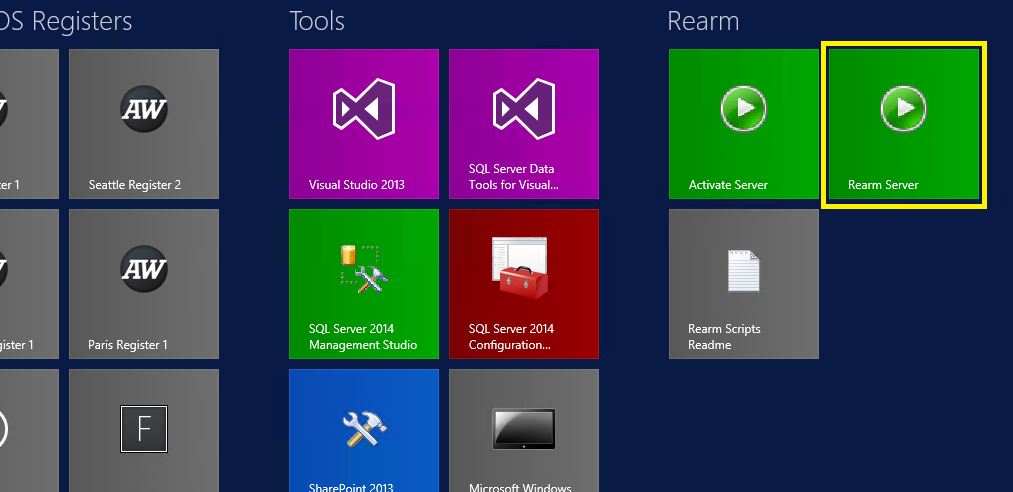
The machine was built off of a script where the server needed to be 'rearmed' so the license is no longer expired. There are two ways to do this:

  1. Click the 'Rearm Server' script in the start menu all the way to the right (Figure 2)
  2. Open the command prompt as an admin and type in 'slmgr -rearm'.
The server will restart and when you log back in, the license will no longer be expired. 

Easy to fix for the demo machines that are available out of the box. 

Special thanks to Devin @devkitt

Figure 2 - The 'rearm server' script